How to find what you need to teach
This guide walks you from your program’s home page to every guide, page, and resource you’ll need during a teaching week. Hover any of the numbered notes below a screenshot and the part of the screenshot it describes will be outlined in gold. Click any Open the real page link to land on the actual page in the portal.
The four buttons at the top of every program
Every program page starts with four buttons. They take you to the materials that cover the whole phase — the things you want before you open any one lesson.

- 1Phase prep guide. Read this first when a new phase begins. It tells you what’s coming over the next several weeks.
- 2Phase parent guide. A one-page printable for families to keep at home for the whole phase.
- 3Project docs. Notes that apply to the whole program, not just one phase. Empty for now — we’ll add documents here as we write them.
- 4Source catalog. The full set of books used in this phase. We’ll come back to it on Page 2.
Every long guide has its own menu
The Phase Prep Guide — and every long document in the portal — opens with a menu just under its title. Use it to jump to the part you need. You don’t have to scroll through the whole thing to find it.

- 1The menu of sections. Every Phase Prep Guide has the same six parts — At a Glance, Arc, Prep Priorities, Source Calendar, The DODO Method, Admin Notes. Once you’ve used one of these guides, you’ll know exactly where to look in every other one.
The lesson’s own buttons
Every Lesson page has two buttons of its own at the top. They stay reachable as you scroll, so you can use them at any moment during a lesson.

- 1Home review. The one-page PDF you’ll send home with families after class. You can open it ahead of time to see what they’ll see.
- 2Source catalog. The same catalog as on the program page, but reachable from inside the lesson. Useful when you want to browse a book on your own — not following a specific link.
Reading page numbers are links
In the Guided Reading section, every page number you see in purple is a link. Click pp. 9–14 and the book opens to page 9, ready for you to read forward.

- 1The required reading link. Opens the book at the first page you’ll be reading.
- 2The suggested passage link. A shorter, more specific page range — pointing to the exact scene named next to it (in this example, the moment when Fidget tries to wake Mud from his trance).
Workshop pages link the same way
The Workshop section works the same way. The main teaching book for the day is marked with an orange PRIMARY tag, and the page range on the right is a link.

- 1The PRIMARY tag. Marks the main book for the workshop. Other books in the same section may be marked SUPPORTING.
- 2The page range link. Opens the workshop book at the start of the unit you’ll teach (page 17, in this example).
Where the links take you: the Source Catalog
Every page number link in a lesson opens here. The Source Catalog is the phase’s whole reading library, organised by book — the novel on the left, the workshop books beside it.
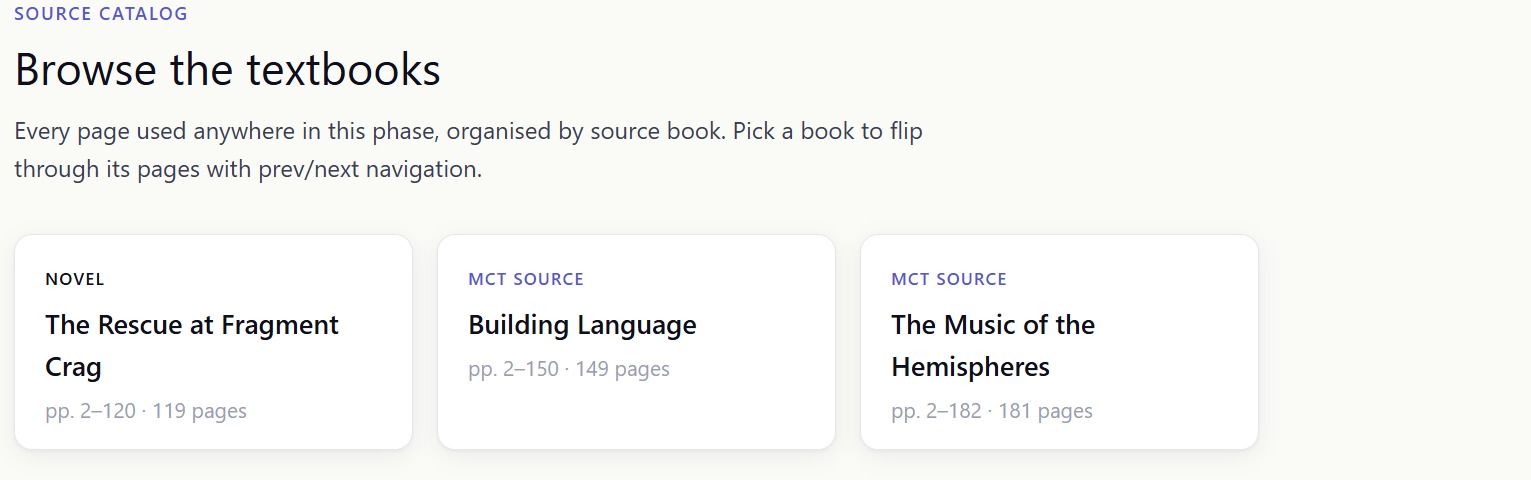
- 1The three book cards. Each card is one of the books used in this phase — the novel your lessons read together (on the left), and the workshop books beside it. Click any card to open that book and flip through its pages with prev/next. Each card also shows the pages used and the total page count.